3 posts tagged with "proxy"

View All Tags

Realtime WebRTC HTTP Endpoints

Sameer Kankute
SWE @ LiteLLM (LLM Translation)
Krrish Dholakia
CEO, LiteLLM
Ishaan Jaff
CTO, LiteLLM

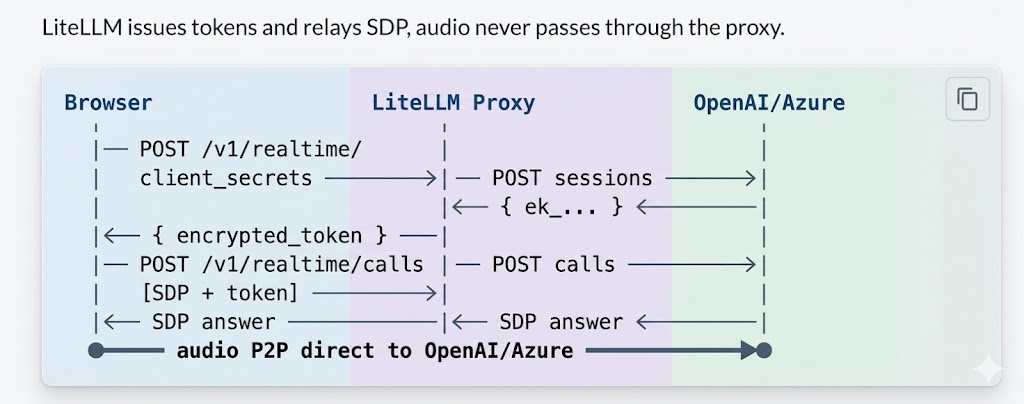
Connect to the Realtime API via WebRTC from browser/mobile clients. LiteLLM handles auth and key management.

How it worksโ€‹

WebRTC flow: Browser, LiteLLM Proxy, and OpenAI/Azure

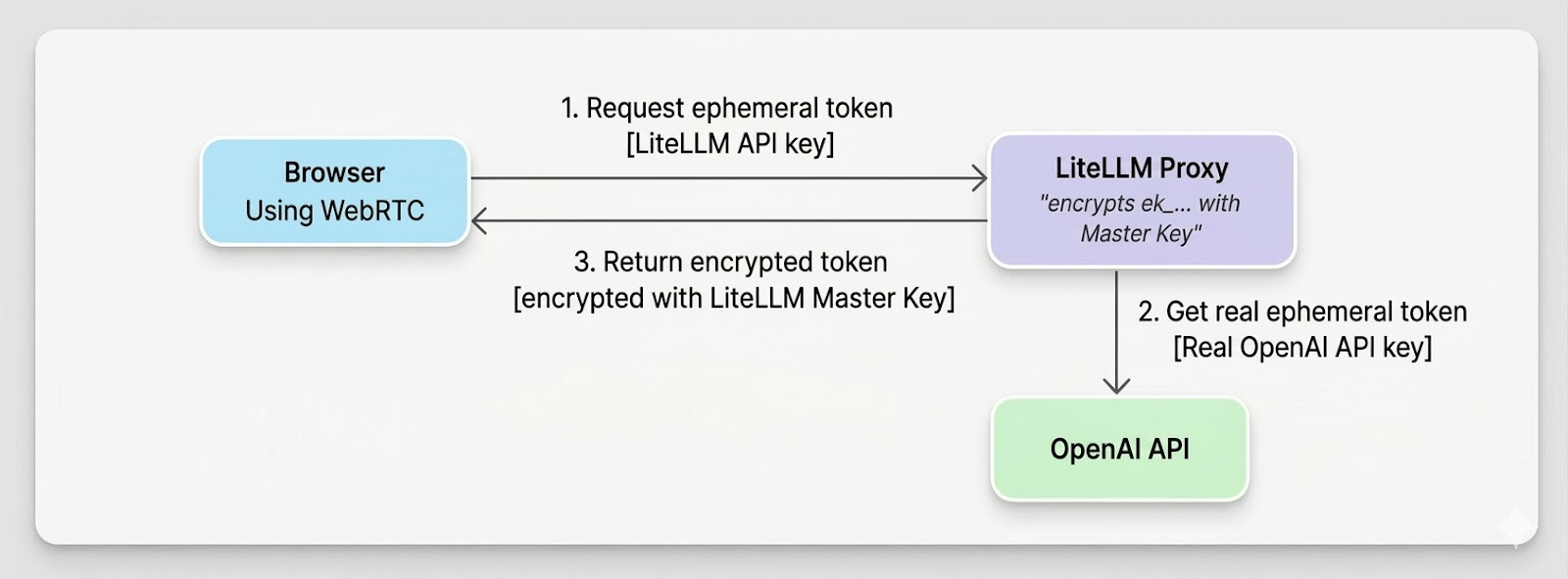
Flow of generating ephemeral token

Ephemeral token flow: Browser requests token, LiteLLM gets real token from OpenAI, returns encrypted token

Proxy Setupโ€‹

model_list:
- model_name: gpt-4o-realtime
litellm_params:
model: openai/gpt-4o-realtime-preview-2024-12-17
api_key: os.environ/OPENAI_API_KEY
model_info:
mode: realtime

Azure: use model: azure/gpt-4o-realtime-preview, api_key, api_base.

litellm --config /path/to/config.yaml

Try it liveโ€‹

INTERACTIVE TESTER
Browser โ†’ LiteLLM โ†’ OpenAI ยท WebRTC
โ–ผ

Client Usageโ€‹

1. Get token - POST /v1/realtime/client_secrets with LiteLLM API key and { model }.

2. WebRTC handshake - Create RTCPeerConnection, add mic track, create data channel oai-events, send SDP offer to POST /v1/realtime/calls with Authorization: Bearer <encrypted_token> and Content-Type: application/sdp.

3. Events - Use the data channel for session.update and other events.

Full code example
// 1. Token
const r = await fetch("http://proxy:4000/v1/realtime/client_secrets", {
method: "POST",
headers: { "Authorization": "Bearer sk-litellm-key", "Content-Type": "application/json" },
body: JSON.stringify({ model: "gpt-4o-realtime" }),
});
const { client_secret } = await r.json();
const token = client_secret.value;

// 2. WebRTC
const pc = new RTCPeerConnection();
const audio = document.createElement("audio");
audio.autoplay = true;
pc.ontrack = (e) => (audio.srcObject = e.streams[0]);
const ms = await navigator.mediaDevices.getUserMedia({ audio: true });
pc.addTrack(ms.getTracks()[0]);
const dc = pc.createDataChannel("oai-events");
const offer = await pc.createOffer();
await pc.setLocalDescription(offer);

const sdpRes = await fetch("http://proxy:4000/v1/realtime/calls", {
method: "POST",
headers: { "Authorization": `Bearer ${token}`, "Content-Type": "application/sdp" },
body: offer.sdp,
});
await pc.setRemoteDescription({ type: "answer", sdp: await sdpRes.text() });

// 3. Events
dc.send(JSON.stringify({ type: "session.update", session: { instructions: "..." } }));

FAQโ€‹

Q: What do I do if I get a 401 Token expired error?
A: Tokens are short-lived. Get a fresh token right before creating the WebRTC offer.

Q: Which key should I use for /v1/realtime/calls?
A: Use the encrypted token from client_secrets, not your raw API key.

Q: Should I pass the model parameter when making the call?
A: No, the encrypted token already encodes all routing information including model.

Q: How do I resolve Azure api-version errors?
A: Set the correct api_version in litellm_params (or via the AZURE_API_VERSION environment variable), along with the right api_base and deployment values.

Q: What if I get no audio?
A: Make sure you grant microphone permission, ensure pc.ontrack assigns the audio element with autoplay enabled, check your network/firewall for WebRTC traffic, and inspect the browser console for ICE or SDP errors.

Incident Report: Encrypted Content Failures in Multi-Region Responses API Load Balancing

Sameer Kankute
SWE @ LiteLLM (LLM Translation)
Krrish Dholakia
CEO, LiteLLM
Ishaan Jaff
CTO, LiteLLM

Date: Feb 24, 2026
Duration: Ongoing (until fix deployed)
Severity: High (for users load balancing Responses API across different API keys)
Status: Resolved

Summaryโ€‹

When load balancing OpenAI's Responses API across deployments with different API keys (e.g., different Azure regions or OpenAI organizations), follow-up requests containing encrypted content items (like rs_... reasoning items) would fail with:

{
"error": {
"message": "The encrypted content for item rs_0d09d6e56879e76500699d6feee41c8197bd268aae76141f87 could not be verified. Reason: Encrypted content organization_id did not match the target organization.",
"type": "invalid_request_error",
"code": "invalid_encrypted_content"
}
}

Encrypted content items are cryptographically tied to the API key's organization that created them. When the router load balanced a follow-up request to a deployment with a different API key, decryption failed.

  • Responses API calls with encrypted content: Complete failure when routed to wrong deployment
  • Initial requests: Unaffected โ€” only follow-up requests containing encrypted items failed
  • Other API endpoints: No impact โ€” chat completions, embeddings, etc. functioned normally

Incident Report: Wildcard Blocking New Models After Cost Map Reload

Sameer Kankute
SWE @ LiteLLM (LLM Translation)
Krrish Dholakia
CEO, LiteLLM
Ishaan Jaff
CTO, LiteLLM

Date: Feb 23, 2026
Duration: ~3 hours
Severity: High (for users with provider wildcard access rules)
Status: Resolved

Summaryโ€‹

When a new Anthropic model (e.g. claude-sonnet-4-6) was added to the LiteLLM model cost map and a cost map reload was triggered, requests to the new model were rejected with:

key not allowed to access model. This key can only access models=['anthropic/*']. Tried to access claude-sonnet-4-6.

The reload updated litellm.model_cost correctly but never re-ran add_known_models(), so litellm.anthropic_models (the in-memory set used by the wildcard resolver) remained stale. The new model was invisible to the anthropic/* wildcard even though the cost map knew about it.

  • LLM calls: All requests to newly-added Anthropic models were blocked with a 401.
  • Existing models: Unaffected โ€” only models missing from the stale provider set were impacted.
  • Other providers: Same bug class existed for any provider wildcard (e.g. openai/*, gemini/*).